Description
A home page that finally shows the essentials
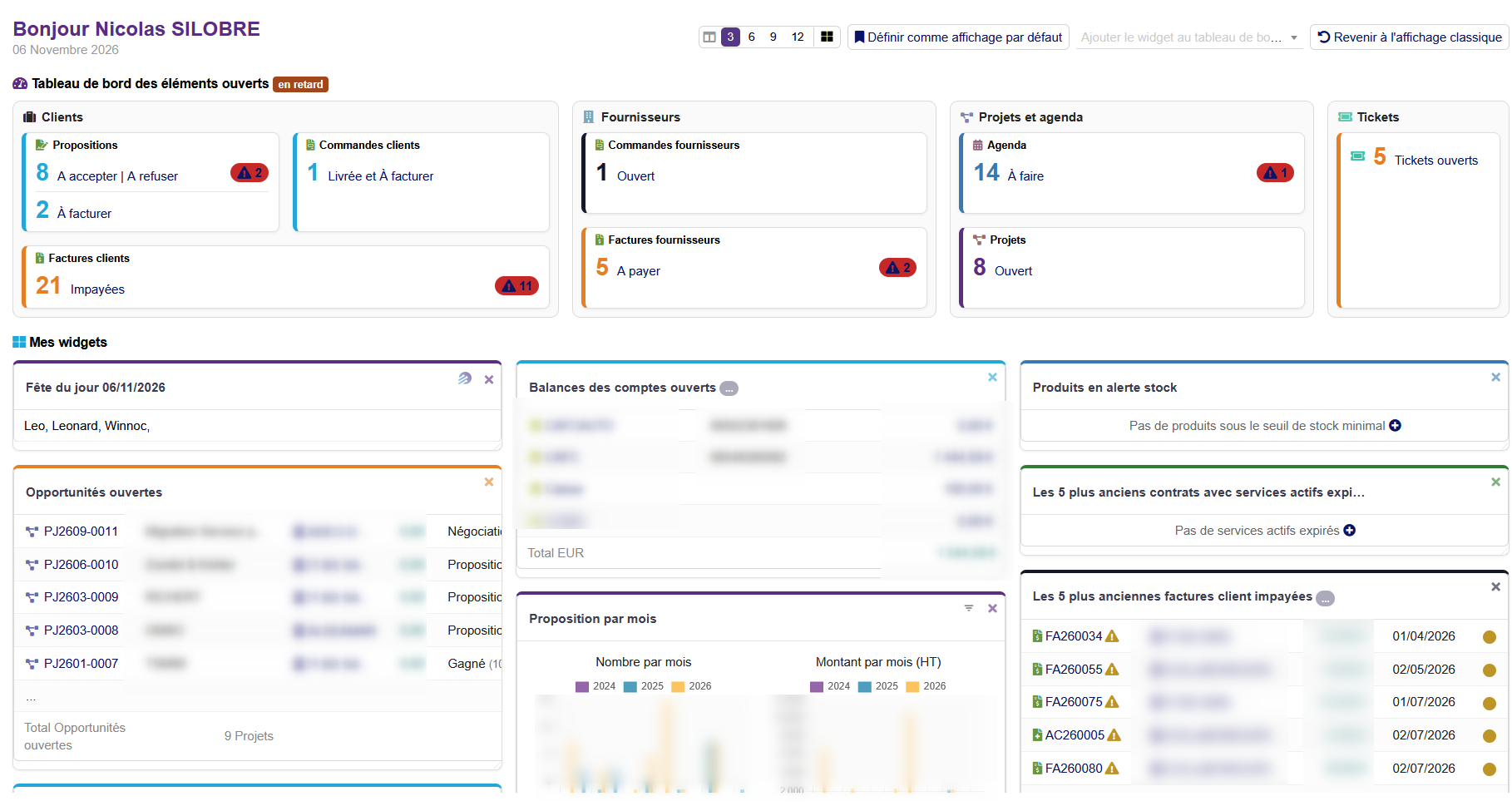
The home page of Dolibarr shows a list of widgets and a scattered dashboard. NSINFO Dashboard replaces it with a clear page: your indicators (to accept, to invoice, unpaid, open tasks, tickets…) are grouped by theme (customers, suppliers, projects, tickets), with their late items in color, then your Dolibarr widgets right below.
New in version 23.2.3: more modern and more personal cards.
New: modern cards, a color per card, separators
- A color per card: each card of an index and each widget of the home page has its own color picker, with a return to the index color in one click; the administrator can impose it.
- Separators (space, line, dotted, dashed or title) to drop between the cards of the home page, the indexes and the statistics.
- Modern cards: lists, donut statistics and key-figure tiles with rounded corners, which can be turned off card by card.
- Cards to add or remove on each index, which the administrator can impose.
- Relooked statistics pages: filter, key figures, table by year, one block per chart and vertical tabs.
Widgets you place the way you want
- Move a widget by its title bar or its handle.
- Resize it like a window: left and right edges for the width, bottom edge for the height, corner for both.
- Pick a 3, 6, 9 or 12 column grid in one click: widgets snap to the grid.
- Double click the top of a widget: it gets its normal size back.
- « Classic layout » button: all the active widgets are spread by theme, customers together, suppliers together.
- A widget closed then enabled again comes back at the top left (option).
- The widgets of all your modules are kept, including configurable ones.
Every index of Dolibarr, and the ones of your modules
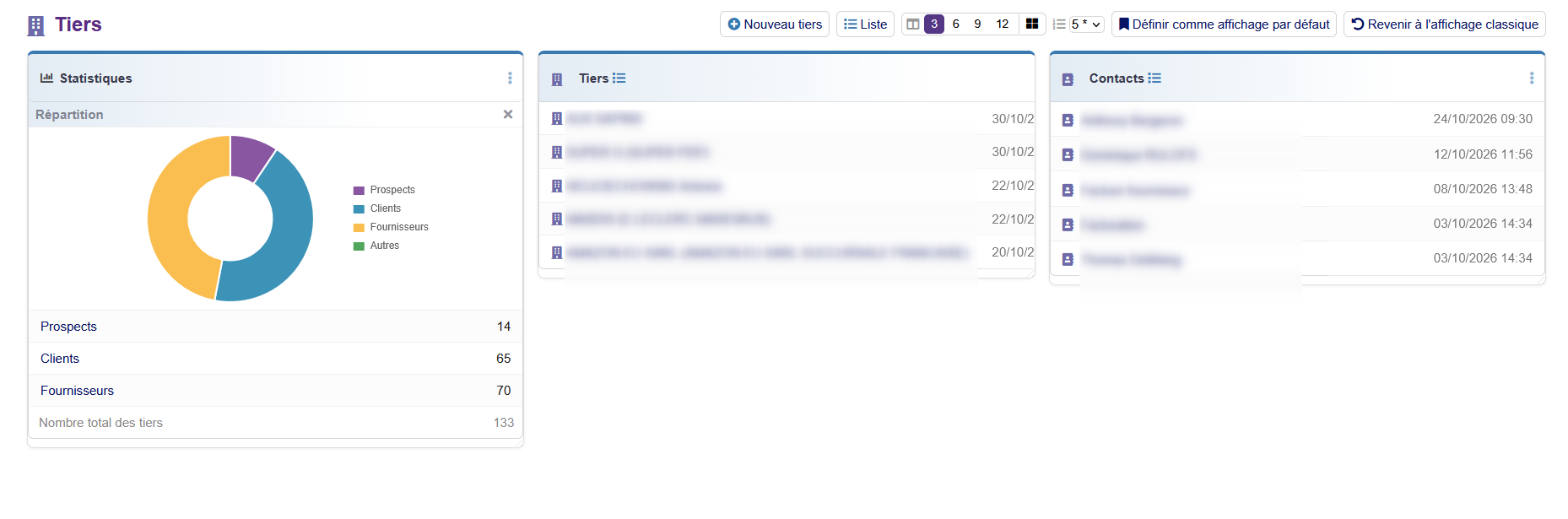
The indexes of the sections (Third parties, Commercial, Billing, Products, Projects, Tickets, Members, Manufacturing, and also proposals, orders, invoices, suppliers, contracts, interventions and shipments) also become dashboards: indicators of the section, statistics with graphs, latest records, shortcuts to create. The indexes of the Dolibarr core (stock, expense reports, accountancy…) and of the other installed modules are found automatically and relooked on the fly, with no module by module setup.
Everyone chooses the display
- A « Back to the classic display » button on every page, per index and per user, and the way back on the original page.
- A « My windows » page (Tools menu): show a hidden indicator or a closed widget again, reset your display.
- The administrator defines display templates (size, visibility, order), given to a user or a group, and lockable.
- Two permissions: use the pages of the module, change the display.
A breadcrumb to find your elements again
- A bar under the top menu keeps track of the elements viewed (third party, project, invoice…), each with its picto and its reference, in bubbles.
- A click goes back to the card; on hover, the label or the references (customer, supplier…) are shown.
- The bar stays visible when the page scrolls, and the left menu stays stuck to the top menu.
- The trail is kept per user: found again at the next login and from one browser to another.
Your navigation, your way
- An eye in the top bar switches all of Dolibarr to the classic display and goes back to your settings in one click; one eye per page for that page only.
- Padlocks fix the moving, resizing and hiding of widgets, indicators and indexes.
- Dynamic left menu, which stays in place when scrolling, and modern top menu: color and spacing of your choice.
- Color per index, chosen by each user or imposed by the administrator (option off by default).
- Settings arranged in tabs, saved as soon as they are changed, with a return to the default value field by field.
Made to be readable
- An « Edit » mode on the open elements board: hide, add (even at zero) and move indicators and groups, a « Late only » button, and the choice of the standard indicators shown in the administration.
- Indicators at zero hidden (option), alert colors and spacing can be set.
- Statistics cards: each graph or table can be removed and put back, number of lines of the cards can be set.
- Colored pictograms, named blocks, uniform heights, display adapted to phones.
- No Core modification of Dolibarr: safe to install and uninstall.
A configuration you can carry
- The configuration (settings, default displays, templates) can be exported and imported as JSON.
- A factory configuration file delivered with the module is loaded at the first initialization, and can be restored.
Highlights
- ✅ Modern home page and indexes, Core untouched
- ✅ Widgets you move and resize like windows
- ✅ 3 / 6 / 9 / 12 column grid in one click
- ✅ Grouped indicators: customers, suppliers, projects, tickets
- ✅ Indexes of the Dolibarr core and of other modules relooked automatically
- ✅ Display templates by user or group, lockable
- ✅ Everyone can go back to the classic display, index by index
- ✅ Statistics with graphs, number of lines of the cards can be set
- ✅ Configuration exportable as JSON, factory configuration delivered with the module
- ✅ Breadcrumb of the elements viewed (picto, reference, tooltip), kept per user
- ✅ New: color per card and separators to drop between the cards
- ✅ New: modern cards, cards to add or remove, relooked statistics pages
- ✅ Eye to switch to the classic display everywhere, padlocks to fix the display
- ✅ Dynamic left menu, fixed when scrolling, and modern top menu
Compatibility
- Dolibarr 20.0 to 24 (developed on Dolibarr 23.0)
- PHP 7.4 to 8.3 (checked on PHP 7.4 and 8.3)
- Requirement: NSINFO framework (module « NSINFO ») version 23.9.2 or higher, installed and enabled
- Multi-company: settings and displays are specific to each entity
- Languages: French, English, German, Spanish, Italian






Reviews
There are no reviews yet.